-
Type:
Bug
-
Resolution: Timed out
-
Priority:
 Medium
-
Component/s: Identity Internal - SAML
-
None
-
16
-
Severity 3 - Minor
Summary
Identity provider(IdP) initiated authentication for Azure AD doesn't work if SAML doesn't work if the "Atlassian Cloud" Azure AD app is configured as per the documentation: Atlassian Cloud tutorial: Configure Azure AD SSO.
Environment
- SAML configured with Azure AD as the IdP
Steps to Reproduce
- Configure SAML as per the instructions here
- Your config should look something like this:
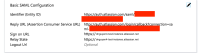
- Save the configuration
- Try logging in via myapps.microsoft.com

Expected Results
- You're logged into the instance. In our example, that instance would be "dnguyen4-test-instance.atlassian.net"
Actual Results
- The login process is stuck at the https://id.atlassian.com site
- Redirection to the instance does not occur and the SAML login process stops here:


Notes
- Documentation is out of date, but the root cause of the problem may be due to changes in Atlassian Identity or the "Atlassian Cloud" Azure AD app maintained by Microsoft
- The current redirection flow is (IdP) > id.atlassian.com > start.atlassian.com > (Cloud instance). The "Atlassian Cloud" Azure AD app may not be considering the redirect to "start.atlassian.com" or similar scenario
Workaround
On the SIngle Sign On configurations in Azure.

- Remove the value for Sign on URL and leave it empty.
- Set the Relay State to your cloud site URL https:// *.atlassian.net site or https://start.atlassian.com


- mentioned in
-
Page Loading...