-
Type:
Bug
-
Resolution: Unresolved
-
Priority:
 Low
Low
-
None
-
Affects Version/s: 5.2.0, 5.1.2
-
Component/s: Core features
-
None
-
2
-
Severity 3 - Minor
-
1
Problem
The users with capital letters included in their usernames can't be searched on the current user sessions page.
Environment
Crowd 5.1.2
Steps to Reproduce
- Create a user with username that includes capital letter/s (i.e. User):
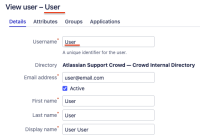
- Open a parallel Crowd session with the new user to be sure that this user has a valid session currently.
- In the previous page (admin user session), navigate to the Administration > Current sessions > User sessions and verify that you can see both admin and new user (User).
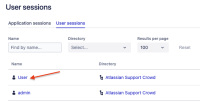
- Search for the new user (User) on the current page.
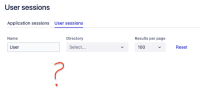
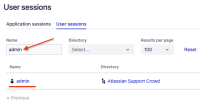


Expected Results
You should be able to filter your new user (User).
Actual Results
The search returns no value.
Workaround
No workaround available currently
Notes
The issue is reproduced on Crowd 5.2.0


- is cloned by
-
KRAK-5451 Loading...