-
Type:
Bug
-
Resolution: Low Engagement
-
Priority:
 Low
Low
-
None
-
Affects Version/s: 2.8.4
-
Component/s: None
-
3
-
Severity 3 - Minor
-
0
Summary
Users that has been granted Admin rights in Crowd Application does not have any Admin rights and is not distinguishable than Non-Administrators users
Steps to Reproduce
- Create a group called 'crowd-system-administrators' in the Crowd internal directory
- Insert the user 'poweruser' to this group
- Go to Crowd Admin > Applications > Crowd > Directories > Make sure Allow All to Authenticate is set to "True" for Crowd internal directory
- Go to Crowd Admin > Applications > Crowd > Groups > Add crowd-system-administrators, and give this group only "Admin" rights (make sure System Administrator is unticked):
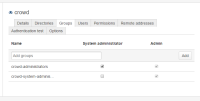
- Login as 'poweruser' into Crowd

Expected Results
User 'poweruser' able to administer Crowd to a certain level, although does not have all privileges such as those belong to 'crowd-administrators' right
Actual Results
User 'poweruser' does not have any privilege to administer anything in crowd, except the 'Self-Service Console' that Non-Administrators user also able to access

Suggestions:
- Have a different level of "Administration" Function
- If the rights "Admin" is to be able to administer own account, the "Admin" is quite misleading and should be changed to "User"


- links to

- relates to
-
KRAK-21 Loading...