-
Type:
Bug
-
Resolution: Unresolved
-
Priority:
 Low
Low
-
None
-
Affects Version/s: 9.4.1
-
Component/s: User - Global / Space Permissions
-
Severity 2 - Major
Issue Summary
After applying the -Datlassian.pats.max.tokens.expiry.days system property via Java Options to control the Maximum number of days for a token to expire, the Create button cannot be clicked in Confluence when attempting to generate a token with the default, provided value. You must set it to 1 day less than the max setting.
Steps to Reproduce
- Follow Configuring System Properties to implement a 10 day maximum:
CATALINA_OPTS="-Datlassian.pats.max.tokens.expiry.days=10 ${CATALINA_OPTS}"
- Restart Confluence
- Attempt to create a new personal token where it shows the new max value:
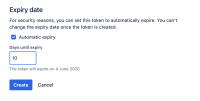
- Click the Create button

Expected Results
- You can click Create to generate a personal token
Actual Results
- You are no longer able to click Create
- The HAR file doesn't show any activity
- The logs don't show any activity
- Tested in Chrome and Firefox
Workaround
You must change the input field value. Delete the default value of 10, enter 10 again, and click the Create button to proceed.


