-
Type:
Bug
-
Resolution: Fixed
-
Priority:
 Low
Low
-
Affects Version/s: 9.1.0, 7.19.27, 8.5.16
-
Component/s: Content - Attachments
-
1
-
Severity 3 - Minor
-
1
Issue Summary
Confluence Upload Attachment in the Edit Mode of the Page throws the duplicate error.
Attach File (Dialog box)
"File Name1" too big to upload. The file must be less than 2mb.
"File Name1" too big to upload. The file must be less than 2mb.
This is reproducible on Data Center: (yes)
Confluence 7.19.27  Replicable
Confluence 8.5.16 Replicable
Confluence 9.1.0 Replicable
Steps to Reproduce
- Set the attachment limit to 2Mb (anything) under -> General Configuration -> Attachment Settings
- Create a Test Page and publish.
- Edit the Page - closed without publishing - Page will be in the "Unpublished changes" state.
- Edit the same "Unpublished changes" page again and Drag and drop the attachment (size bigger than the set limit); it will pop up an error multiple times.
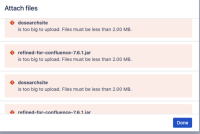
 Noe: This seems to be more of a Cosmatic error as it is not breaking anything, and we always have the option to re-upload and multiple ways to upload the files.

Expected Results
Error messages should not be duplicated.

Actual Results
Attach File Error should have been reported only one for every file rather than the duplicate.

Workaround
Currently there is no known workaround for this behavior. A workaround will be added here when available


- mentioned in
-
Page Loading...