-
Type:
Bug
-
Resolution: Fixed
-
Priority:
 Low
Low
-
Affects Version/s: 8.5.15
-
Component/s: Macros - Chart
-
2
-
Severity 3 - Minor
-
5
Issue Summary
This is reproducible on Data Center: yes
CONFSERVER-95140 was recently resolved as closed in 8.5.15.
However, the issue persists and/or a related issue continues.
When using the Chart Macro, type timeseries, it's possible to specify the Date Format to be used in the chart. This previously couldn't handle conversions. For example, if you use the date 2024-10-10 but the Date Format d-MMM, you would previously get an error, like "Error rendering macro 'chart'". Now, it is simply ignored.
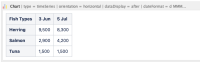
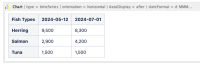
The Chart Macro displays different dates altogether or even appends a year to the date if the table dates follow the same format d-MMM.
Steps to Reproduce
- Create a Chart Macro type timeseries with the Date Format type of d-MMM.
- Create a table within the Chart Macro like:
or


3. Save and view the page.
Expected Results
- The dates in the table are preserved and displayed in the expected d-MMM format in the chart.
- The dates in the table are converted and displayed in the d-MMM expected format in the chart.
Actual Results
- The month and day are now incorrect and if there is no year present in the table, /1970 is added.

Workaround
Currently there is no known workaround for this behavior. A workaround will be added here when available


- is related to
-
-
- Closed
-
- mentioned in
-
Page Loading...