-
Type:
Bug
-
Resolution: Fixed
-
Priority:
 Low
Low
-
Affects Version/s: 7.10.1, 8.5.4, 8.7.1, 8.5.12, 8.5.14
-
Component/s: Macros - Table of Contents
-
2
-
Severity 3 - Minor
Issue Summary
When clicking a header from table of content macro, it will jump to the place with corresponding header.
However, if copy the URL into new tab/window, it shows different place, where header is not included.
This problem happens when using a Japanese(or non english characters) title, or using Japanese(or non english characters) headers in page.
This is reproducible on Data Center: (yes)
Steps to Reproduce
- Create a page with some heading in Japanese (or non english characters) , and each heading section has some lines of paragraph
- Create table of content, save the page. Viewing page will show like below.
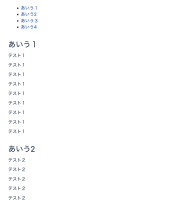 .
. - Click second header from table of content, the page will jump to it.
- Copy the url , and paste into a new tab of browser

Expected Results
Should jump to the same place as clicking from table of content

Actual Results
Jump to the different place. Seems header is not included.

Workaround
Currently there is no known workaround for this behavior. A workaround will be added here when available


- mentioned in
-
Page Loading...