-
Type:
Bug
-
Resolution: Answered
-
Priority:
 Low
Low
-
None
-
Affects Version/s: 7.13.2, 7.17.0
-
Component/s: Content - Attachments
-
None
-
2
-
Severity 3 - Minor
Issue Summary
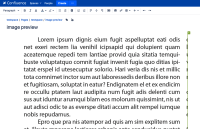
Images larger than 1000px, when previewed inside a page at 1000px are rendered blurry on Chrome (version tested 101.0.4951.64), but rendered clear on other browsers (Firefox, 97.0).
This is reproducible on Data Center: (yes)
Steps to Reproduce
- Insert an image larger than 1000px with text content inside a page.
- Change its resolution to 1000px
Expected Results
- The preview should show a clear text even at a smaller resolution (see image from Firefox)
Actual Results
- The text is blurred (this can make the image harder to read with smaller text)

Workaround
Use images with less than 1000px or change the resolution of the preview to 1018px or more.


