-
Type:
Bug
-
Resolution: Fixed
-
Priority:
 Medium
-
Affects Version/s: 7.14.0
-
Component/s: Apps - Team Calendar
-
None
-
10
-
Severity 3 - Minor
-
52
Issue Summary
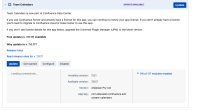
In Data Center, Team Calendar is bundled with Confluence. Version 7.3.1 is a higher version, but not found in the TC version history. Version 7.0.17 is the recent version. If you attempt to update the plugin, nothing happens.
Steps to Reproduce
- Upgrade or install Data center 7.14.
- Navigate to
 > Manage apps.
 - Expand the view for Team Calendars.
Expected Results
- TC version to match the latest in version history.
- Or TC show version 7.3.1 as the latest version.
Actual Results
TC displays:
- Installed version:7.3.1
*Available version:7.0.17

Workaround
Currently there is no known workaround for this behavior. A workaround will be added here when available

- is caused by
-
BSP-3350 Loading...