-
Type:
Bug
-
Resolution: Unresolved
-
Priority:
 Low
Low
-
None
-
Affects Version/s: TC-7.0.17
-
Component/s: Apps - Team Calendar
-
None
-
6
-
Severity 3 - Minor
-
2
Issue Summary
In certain conditions, deleting all future occurrences of an event in Team Calendar removes the event from the TC UI, however, it does not remove the event from the database. When the calendar is exported to .ics, the deleted events can still be found and are imported to external calendars such as Outlook and iCal
Steps to Reproduce
Add a new event with the following steps. To reporudce the issue, it has to be exactly the following steps.
- Head over to TC and create a new event
- Set start date to a date in the future
- Set end date to a date a couple of month after the start date
- Set event to repeat weekly
- Set end date for repeating event
- Save event
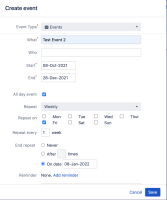
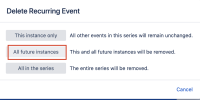
- Delete event in Team Calendar with option all future instances. For this step, delete the first occurrence of the event so when you remove the event and its future instances the whole event is removed.
- Export Calendar to Outlook/ical


Expected Results
- The event is removed from the database i.e. AO_950DC3_TC_EVENTS table
- The event is not found in the exported .ics file
- The deleted event is not shown in Outlook/iCal when importing
Actual Results
- The event is removed from the Team Calendar UI
- The event is not removed from the database i.e. AO_950DC3_TC_EVENTS table
- The event can still be found in the exported .ics file, which subsequently mens that if it was imported to Outlook or iCal, this event will be imported.
Workaround
At the moment there is no workaround.

