-
Type:
Bug
-
Resolution: Unresolved
-
Priority:
 Low
Low
-
None
-
Affects Version/s: 7.4.3, 7.10.0, 8.5.9
-
Component/s: Macros - Chart
-
None
-
5
-
Severity 3 - Minor
-
0
Issue Summary
Chart macro of type timeSeries doesn't work with 53 week years when using Date format w-y
The year 2020 had 53 weeks and the issue happens when we start to add the weeks of 2021, the macro doesn't render a graph anymore and the following error was thrown:
You are attempting to add an observation for the time period Week 1, 2021 but the series already contains an observation for that time period. Duplicates are not permitted. Try using the addOrUpdate() method.
Environment
Reproduced in Confluence 7.4.3 and 7.10.0
Steps to Reproduce
Please use this test_storage_format to see this behavior
Or you can follow the steps below:
- Add a chart macro to a Confluence page with the following options:
- Type: timeSeries
- Date format: w-y
- Time Period: week
- In the Chart macro create a table where the first row contains the week of the year, make sure to add week 53 of 2020 and then week 1 of 2021
- Add another row with values, the table should look like the table below:
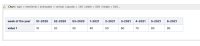
- Try to preview the result or Save the page

Expected Results
The Chart macro can render the graph with information from the weeks of the year without issues.
Actual Results
The chart doesn't render at all and the following error is shown:
You are attempting to add an observation for the time period Week 1, 2021 but the series already contains an observation for that time period. Duplicates are not permitted. Try using the addOrUpdate() method.

Workaround
1. Change the chart type to 'line' instead of timeSeries.
or
2. Change the date format to "d-M-y", however, to do this you also have to change the entire first row data to match the new date format, so instead of using 2-2021 change all dates to 4-1-2021, this might not be feasible depending on how many weeks the table has.


- mentioned in
-
Page Loading...