-
Type:
Bug
-
Resolution: Low Engagement
-
Priority:
 Low
Low
-
None
-
Affects Version/s: 7.9.0, 7.10.1
-
Component/s: Navigation - Dashboard
-
1
-
Severity 3 - Minor
Issue Summary
When changing a color of any of the options under Color Scheme, the links also change color to what should be the default.
Steps to Reproduce
- Go to
 > General configuration > Color scheme;
 - Reset Color Scheme to default;
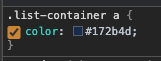
- The links color will be set to #0052CC (blue), however, on the Dashboard, they appear as #172B4D (navy blue):

- Change any color but the links.


Expected Results
The default color for the links should be blue already.
Actual Results
Even with the default color set to blue, if nothing's changed under color scheme, the links will all be navy blue.
Workaround
If you'd like to keep the navy blue while changing other colors on the color scheme, use the hexadecimal color #172B4D.


- mentioned in
-
Page Loading...