-
Type:
Bug
-
Resolution: Low Engagement
-
Priority:
 Low
Low
-
None
-
Affects Version/s: 7.9.1
-
Component/s: Content - File Previews
-
1
-
Severity 3 - Minor
Issue Summary
Previewing "Table of Content" from a docx attachment, with Office Word Macro will display a broken table list, without page numbers.
Steps to Reproduce
- Import a sample attachment with a table of content: Table of Contents example.docx

- Save page
- In the preview of the attachment TOC is displayed correctly
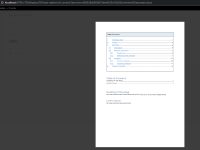

- Edit the page and create Office Word Macro from the same attachment.
- Save and preview the page
Expected Results
TOC is displayed correctly for the page
Actual Results
TOC is displayed with broken styling and without the actual page numbers.

Workaround
The issue seems to be not present in Confluence 7.4 or 7.7 style vise, but numbers are still missing.

A potential worakround might be to use javascript to alter css behavior:
<script>
AJS.toInit(function() {
setTimeout(function() {
            var element=$( ".converter-macro-content a[href*='#_Toc']" );
   element.children().css( "width", "auto" );
        }, 500);
 });
</script>


