-
Type:
Bug
-
Resolution: Fixed
-
Priority:
 Low
Low
-
Affects Version/s: 7.1.2, 7.3.4, 7.4.0, 7.5.2, 7.13.2, 8.5.3, 8.5.8, 8.5.9, 7.19.27, 8.5.18, 9.2.1, 8.5.19, 9.2.8, 9.2.10
-
Component/s: Apps - Team Calendar
-
25
-
Severity 3 - Minor
-
18
Issue Summary
The event creation pop up in the Team Calendar doesn't show up any fields of the event. The fields are only shown up after toggling the event types.
Steps to reproduce
- Create a Team calendar in a Space
- Add a custom event type in the calendar.
- Save an event using the newly created custom type event.
- Now navigate to a different Space.
- Add a new calendar and make sure it doesn't have the custom event type we created in step 2.
- Try to add any event on the calendar.
 If the issue cannot be reproduced with the above steps, below steps can be followed:
- Create a Team calendar in a Space
- Add a custom event type in the calendar.
- Save an event using the newly created custom type event.
- Now navigate to a different Space.
- Add a new calendar
- Create a custom event type and make sure it is not same as the custom event we created in step 2.
- Disable all the default event types and leave the custom one alone.
- Try to add an event to the second calendar.
Expected Behaviour
- The event should open a pop-up with all the fields associated with it.
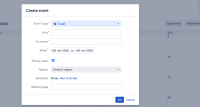

Actual Behaviour
- It looks like while adding the new event, that custom type which was last used event type is being called as the default event type in new calendar. However, the new calendar does not have the custom event type. Therefore, the pop up is incomplete and Confluence just shows the option to use to select an event type and not loading the fields. The fields only appear when we toggle between the event types.
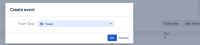

Workaround
Toggle between the event types to show up the fields.


