-
Type:
Bug
-
Resolution: Unresolved
-
Priority:
 Low
Low
-
None
-
Affects Version/s: 6.13.8, 7.1.0
-
Component/s: Editor - Attachment
-
None
-
3
-
Severity 3 - Minor
-
0
Issue Summary
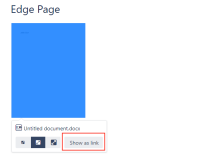
One can attach a document to a Confluence page and select between displaying the attachment as a thumbnail or as a link. By default, a thumbnail is displayed and one would have to click on it then select Show as link to display a link instead of a thumbnail.
When attempting to do that on Microsoft Edge, the operation enters an endless loop and attempts to display the file instead of converting the thumbnail to a link. Therefore, one is unable to convert attachments from thumbnails to links using Edge.
Steps to Reproduce
- Create a page.
- Attach any Office file to it.
- Save the page.
- At this point, the attachment should be displayed as a thumbnail.

- Edit the page.
- Click the thumbnail and click on Show as link.


Expected Results
Thumbnail is converted to link as can be seen below and one is able to save the page changes:

Actual Results
Edge actually opens the document contents and display them:

Once you close the preview you can save changes, but nothing really change as Edge is unable to convert the attachment to a link.
Workaround
Not exactly a workaround, but use any other browser instead of Edge.


