-
Type:
Bug
-
Resolution: Unresolved
-
Priority:
 Low
Low
-
None
-
Affects Version/s: 6.14.1
-
Component/s: Editor - Front end - Page / Comment
-
2
-
Severity 3 - Minor
Issue Summary
Unable to copy and paste the tables on Windows 10 when using Edge browser
Environment
- Microsoft Windows 10
- Microsoft Edge
- Confluence 6.14.1
Steps to Reproduce
- Create a table on blank page
- Select all cells in a table
- Right-click on the table and choose Copy
- On a separate tab, open a new page
- Right-click and choose Paste
Expected Results
- Table is pasted with all its structure preserved
Actual Results
- Only table contents are pasted, the table is not included
Notes
Not observed on 6.9.1
Same observed if using the keyboard shortcut
Including content outside of a table does not work
Workaround
The issue is not observed on Mac OS
The issue is not observed on Chrome regardless of OS
Using the Table control menu in confluence to copy and paste rows/columns while the table is selected:
- Select whole table
- In the top bar click Copy table row or Ctrl+Shift+C
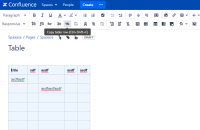
- In new space and page, insert a small one cell table to bring up the Table Management menu
- Then paste your table using Paste table row or Ctrl+Shift+V
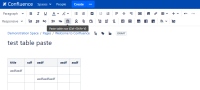
- You might need to delete that one small cell you created
- Should work the same with copying and pasting columns


