-
Type:
Bug
-
Resolution: Low Engagement
-
Priority:
 Low
Low
-
None
-
Affects Version/s: 6.10.2, 6.14.0
-
Component/s: Macros - Gadgets
-
1
-
Severity 3 - Minor
Summary
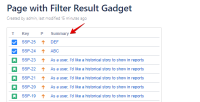
Filter Results Jira Gadget in Confluence showing arrow icon as square box while sorting column manually
When the Filter Results Gadget from Jira is added into Confluence page, sorting the columns supposed to show an arrow beside the column name that indicates ascending or descending order.
The arrow wasn't able to be displayed in Confluence and appears to be a square box instead
Environment
Confluence 6.14.0
Jira 7.13.0
Steps to Reproduce
- Setup Application Links between Confluence and Jira
- Subscribe to the Filter Results Gadget in Confluence. The URL will be something like below:
http://<YourJiraURL>/rest/gadgets/1.0/g/com.atlassian.jira.gadgets:filter-results-gadget/gadgets/filter-results-gadget.xml - Add the Filter Results Gadget in Confluence page
- Sort any column by clicking on the column header

Expected Results
An arrow icon will show beside the sorted column to indicate whether it is sorted in ascending or descending order

 Arrow is showing properly in Jira
Actual Results
A square box appears beside the sorted column instead of the arrow icon

Workaround
Currently there is no known workaround for this behavior. A workaround will be added here when available


