-
Type:
Suggestion
-
Resolution: Unresolved
-
None
-
Component/s: Content - Page
-
None
-
0
-
6
Summary
When a user wants to share a Confluence page to a group, the user needs to know the exact name of the group/user. Currently, there are no preview of all available groups/user and the search feature for the groups/user is not smart enough to detect the full group/user name if the user input is a substring of the name.
For example: In a Confluence instance with the following groups: hr group, finance group. If a user types "group" in the Add People field of the search dialog, Confluence will not retrieve the above groups as options the user can choose from. The user must start his search with "finance" in order for Confluence to retrieve finance group as one of the options.
Steps to Reproduce
Scenario1
- Given a Confluence instance that has the following groups: finance group, hr group
- Navigate to a page and then click "Share"
- In the panel, under Add People, type group

Scenario2
- Given a Confluence instance that has the following group: confluence-bnm-pqr-h
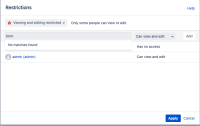
- Navigate to a page, settings and then choose Restriction.
- In the panel, under Type username or group enter "bnm","pqr" and it will not show as results as given below. This happens for both external user directory and local internal directory groups. Surrounding the string with double quotes or adding wildcard character * does not help. If we enter the starting string like confluence it does show the result.
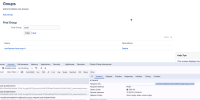


Expected Results
Confluence will give a list of all groups regardless of which part of the group name's string was queried.
Actual Results
Confluence does not retrieve any group.
Improvement Suggestions:
- Make group search "smart" enough to be able to retrieve all groups that has a particular sub-string from the search parameter.
- Display all groups in the dropdown for easy access.


- was cloned as
-
CONFSERVER-59419 Can't search on all parts of a group name when sharing page
-

- Closed
-