-
Type:
Bug
-
Resolution: Low Engagement
-
Priority:
 Low
Low
-
None
-
Affects Version/s: 6.6.7, 6.9.0
-
Component/s: Macros - Attachments
-
6
-
Severity 3 - Minor
-
1
Bug Summary:
PPT file with SmartArt image is not rendered correctly by attachment macro view
Environment:
Confluence 6.9.0, PostgreSQL, Google Chrome
Bug description
PPT file with SmartArt image is not rendered correctly by attachment macro view
Steps to replicate
- Create new ppt presentation by using Microsoft PowerPoint 2010
- From toolbar menu click on Insert -> SmartArt. Add any smartart section
- Save ppt file.
- Create new Confluence page. Upload created ppt attachment.
- Create new attachment macro. (Office PowerPoint macro also affected)
- Save Confluence page
- Preview attachment
- Expand attachment macro and click on view
Expected results
6) and 7) replication steps give consistent results
Actual results
- PPT file uploaded directly to the page is rendered correctly
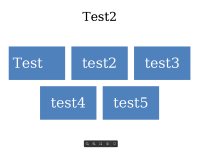
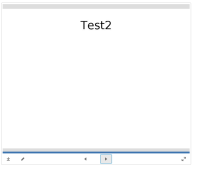
- Attachment macro view option doesn't contain SmartArt graphics


Workaround
Upload ppt attachment file directly to the page.

