-
Type:
Bug
-
Resolution: Unresolved
-
Priority:
 Low
Low
-
None
-
Affects Version/s: 6.8.1
-
Component/s: Apps - Team Calendar
-
None
-
2
-
Severity 3 - Minor
Summary
When there are several all-day events on a Calendar, the "hourly" portion of the calendar can become unusably small in the "Week" view, depending on the size of the browser window.
Environment
Verified in Chrome and Firefox, using Team Calandars 6.0.12 on Confluence 6.8.0.
Steps to Reproduce
- In Team Calendars, create 4 or more all-day events with long descriptions
- Select the "Week" view
- Adjust the width of the window to various sizes
Expected Results
- At all window sizes, the calendar adjusts to show all data
Actual Results
- At a certain width, the "All day" section takes over, leaving the "hourly" portion just a few pixels tall.
- The exact behavior and window size seems to vary based on the data shown in the calendar, but in the example below, the issue presented itself when the browser was between about 1500 and 2340 pixels wide:
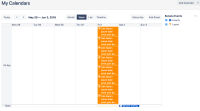
- At smaller sizes, the entire agenda block is scrollable, allowing you to scroll down to move up the "All day" portion and see more of the "Hourly" portion. When this bug is happening, however, the "All day" and "Hourly" section heights are fixed.

Workaround
Adjust the window to a different size and refresh the page.

- mentioned in
-
Page Loading...