-
Type:
Bug
-
Resolution: Fixed
-
Priority:
 Low
Low
-
Affects Version/s: No-Version
-
Component/s: Apps - Team Calendar
-
Severity 3 - Minor
NOTE: This bug report is for Confluence Server. Using Confluence Cloud? See the corresponding bug report.
Summary
When Team Calendar is not enabled on an instance, users can still see the Calendars link. When trying to create a Calendar the create window does not respond.
Steps to Reproduce
- A new instance without Confluence Team Calendar Enabled
- Navigate to a space
- Click on Calendars
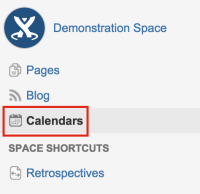
- Or Click the Create option
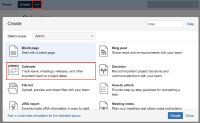
- Choose Calendar
- Add Calendar
- Add New Calendar


Actual Result
The fields in the popup window will not respond.
Expected Result
User should be notified that the plugin needs to be enabled.
Workaround
Start trial for Team Calendar.


- relates to
-
-
- Closed
-
-
-
- Closed
-
- included in
-
![[JIRA]](/images/icons/generic_link_16.png "[JIRA]") CPU-92
team-calendars 5.3.9-D20151117T031541
CPU-92
team-calendars 5.3.9-D20151117T031541