-
Type:
Bug
-
Resolution: Fixed
-
Priority:
 Medium
-
Affects Version/s: No-Version
-
Component/s: Apps - Team Calendar
-
Environment:
Windows 7,8 and Google Chrome
-
Severity 3 - Minor
NOTE: This bug report is for Confluence Server. Using Confluence Cloud? See the corresponding bug report.
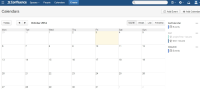
Team Calendar events is not showing in Google Chrome when the timezone for Confluence is set to Moscow, St. Petersburg, Volgograd and the user's Windows PC timezone is set to Moscow, St. Petersburg, Volgograd as well.
Steps to reproduce
- Set Confluence timezone to Moscow, St. Petersburg, Volgograd
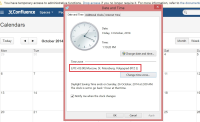
- Login with a Windows PC with Google Chrome. Set the timezone to Moscow, St. Petersburg, Volgograd like the screenshot below
- Go to Team Calendar and you will see that all events are not shown
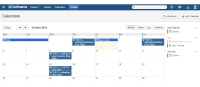
- Change timezone to other timezone in Windows. You will see that all events is now shown.


This is occurring on the latest version of Team Calendar (5.0.5)
Workaround
- Change the timezone of the Windows PC that is affected to a different timezone. However, please note that this might trigger other bugs on other applications.
- Alternatively, use a different browser other than Google Chrome. (eg. IE or Firefox)


- relates to
-
-
- Closed
-