-
Type:
Bug
-
Resolution: Timed out
-
Priority:
 Low
Low
-
None
-
Affects Version/s: 6.0.1, 6.0.2, 6.12.0
-
Component/s: User - Management
-
1
-
Severity 3 - Minor
Summary
Users are able to edit their user details even though the user belongs to a directory with a Delegated authentication
Steps to Reproduce
- Have a Confluence connected to a user directory with a Delegated LDAP Authentication settings
- Make sure that the user from that directory can log in, and
- Edit the user details from the "Edit Profile" page:
- Login as the user
- Go to their Profile
- Click "Edit Profile"
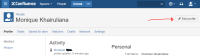
- Change their username and email address
- Edit the user details from the Confluence Administrator page:
- Log in as admin user
- Go to Confluence Admin > Users > Search for this user > Edit Details

Expected Results
Unable to edit profile/some warning is being thrown
Actual Results
Users and Admins are able to change the users' details successfully
However, user details will return to its original value after the next authentication/user logs in


- relates to
-
-
- Gathering Impact
-