-
Type:
Bug
-
Resolution: Fixed
-
Priority:
 Low
Low
-
Affects Version/s: 5.10.3
-
1
-
Severity 3 - Minor
Steps to Reproduce
- Have Confluence 5.10.x installed using the supported version of Java
- Go to Confluence Admin > Support Tools > Instance Health
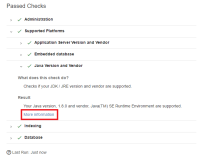
- Scroll down to find "Supported Platforms" > "Java Version and Vendor". Expand this
Actual result
- Result is correctly shown:
Your Java version, 1.8.0 and vendor, Java(TM) SE Runtime Environment are supported.
- However, there is a link of "More Information" that links users to the page JDK is outdated - upgrade Java

Expected result
- Since Java version used complies to the supported Java versions, users are not linked to the page JDK is outdated - upgrade Java
- The "More Information" link embedded would be more appropriate if it's directing users to the Supported Platforms page
