-
Type:
Bug
-
Resolution: Duplicate
-
Priority:
 Low
Low
-
Affects Version/s: 5.2, 5.5.6, 5.6.5, 6.13.5, 6.15.7, 7.16.2, 7.19.5
-
Component/s: Editor - Attachment
-
6
-
Severity 3 - Minor
-
11
Issue Summary
Title and Alt Texts on image properties will not be saved if its contains certain special characters
Steps to Reproduce
- Create a page, add an image
- In the editor mode, select the image to show the image properties panel > select Properties > Title
- Add the following:
- Title Text: test ?
- Alt Text: test ?
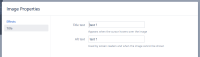
- Save the changes, and save the page.
- Edit and check the image properties window

Expected Results
- The texts are saved
- If there are offending characters, some form of warning should pop up.
Actual Results
The texts are not saved, no warning appears.
Notes
- The alt text is not lost while in the editor (i.e.you can see your text if you open the "properties" a second time).
- Characters that will show issue
- Title field: '?' (question mark),'"' (double quote), ';' (semi colon)
- Alt field: '/' (forward slash) , '':' (colon), '?' (question mark) ,'"' (double quote), ';' (semi colon)
- Characters that will not show issue:
- Title field: '/' (forward slash) and ':' (colon)
- Alt field: '.' (period) or a "'" (single quote)
Workaround
Currently there is no known workaround for this behavior. A workaround will be added here when available

