-
Type:
Bug
-
Resolution: Unresolved
-
Priority:
 Medium
-
None
-
Affects Version/s: 9.2.0, 10.2.0, 10.2.11, 9.2.20
-
Component/s: Platform - Application Links
-
None
-
4
-
Severity 3 - Minor
-
41
Issue Summary
Confluence Data Center loses its Application Link connection to any linked application (Jira, Bitbucket, Bamboo, etc.), resulting in a NETWORK ERROR and an OAuth consumer_key_unknown error. This occurs when the Confluence shared home (NFS/shared drive) becomes temporarily unavailable (for example, during OS patching or maintenance). Instead of failing gracefully, Confluence appears to generate a new application link secret in the <shared-home/secured> directory. Since the remote application does not recognize this new secret, the OAuth handshake fails until the original secret is manually restored or the link is recreated.
Steps to Reproduce
- Set up Confluence Data Center with the shared home directory on an NFS-backed shared drive or Windows share.
- Establish an Application Link with any compatible application (for example, Jira).
- Trigger a temporary interruption of the shared home mount (for example, restart the file server or block network access) while Confluence is running.
- Manually removing/moving the secret file is also an option.
- Attempt to use a feature that relies on the Application Link or navigate to Administration > Application Links.
- Observe that Confluence logs FileSystemException, AccessDeniedException, Input/output error, or MultiFileSecretDao for the shared home path.
- Observe that the Application Link continues to fail even after the shared home is back online.
Expected Results
The Application Link continues to work during the shared home outage or fails gracefully without generating a new secret that permanently breaks the link.
Actual Results
When the shared-home is temporarily unavailable, the existing OAuth secret may not be read correctly, and Confluence may proceed to store a new secret value instead. Once this occurs, the secret stored in Confluence no longer matches the one stored in the remote application, resulting in persistent OAuth consumer_key_unknown failures.
- The Application Link status in the UI shows: NETWORK ERROR.
- When editing the Application Link, it shows:
OAuth problem
There is an issue with the OAuth configuration of the connection to <Application name>.
consumer_key_unknown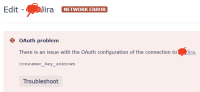
- Confluence logs show OAuth authentication failed: consumer_key_unknown.
- A new secret has been generated under <shared-home/secured>

Workaround
- Restore the Application Link secret file stored under <shared-home>/secured> from a backup.
or - Recreate the application link as per the following document: https://confluence.atlassian.com/applinks/oauth-troubleshooting-guide-790632058.html#OAuthtroubleshootingguide-UnrecognizedOAuthconsumerkey
