-
Type:
Bug
-
Resolution: Fixed
-
Priority:
 Highest
-
Affects Version/s: 9.2.8, 8.5.26, 10.0.3, 9.5.4
-
Component/s: Content - Page
-
20
-
Severity 2 - Major
-
218
Issue Summary
Table column values do not appear on a page following a Confluence upgrade.
 This also affects Page Properties tables.
Steps to Reproduce
- Save the following Storage Format
<table class="fixed-table wrapped"><colgroup class=""> <col class="" style="width: 240.0px;" /> <col class="" style="width: 959.0px;" /> </colgroup>
<tbody class="">
<tr class="">
<th>
<p>Test column 1</p></th>
<td>
<p>Test column 2</p></td></tr></tbody></table>
- Publish and load the page
Expected Results
The Test column 2 should appear on the page.

Actual Results
- The Test column 2 initially appears on the pages
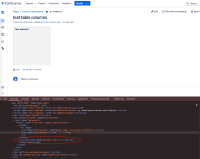
- Very briefly after the page loads, Test column 2 no longer shows on the page

- Inspecting the table HTML shows the colgroup with style="display: none"


Workaround
As a user, you can change the table format from "Fixed Width" to "Responsive."
- Edit the page
- Click inside the table
- Click on the dropdown in the toolbar "Fixed width" and select "Responsive"
- Save page
However, please note that you will lose the precise fixed column widths with this change.
If you require precise fixed column widths, you have the option to disable the impacting feature.
- Log into Confluence administration on this direct URL https://<confluence-base-url>/admin/darkfeatures.action
- Add in a line at the bottom confluence-table-enhancements.sticky-headers.disabled and press Submit
 Remember to remove the confluence-table-enhancements.sticky-headers.disabled dark feature once this issue is resolved


- causes
-
-

- Closed
-
- relates to
-
-

- Closed
-