-
Type:
Bug
-
Resolution: Unresolved
-
Priority:
 Low
Low
-
Component/s: Integrations - Slack
-
None
-
1
-
Severity 3 - Minor
Issue Summary
- When attempting to use the Atlassian Connector with Slack, it fails due to an unapproved permission.
Steps to Reproduce
- Create a simple automation in Confluence.
- Add an "Action" for "Slack - Send message"
- Click "Connect", and you'll hit into this error.
Atlassian Connector could not be installed.
It looks like something has gone awry. Don’t worry it’s not your fault, but you won’t be able to install Atlassian Connector at the moment.

Error details
Unapproved permissions requested
links:read
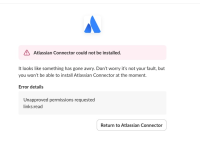
- There is also a button that says "Return to Atlassian Connector" which redirects to this page and returns this error.
https://id.atlassian.com/outboundAuth/finish?error=invalid_scope_requestedRequestValidationError: Schema validation error

Expected Results
- The setup should allow users/connector to authenticate.
Actual Results
- The setup fails due to an unapproved permissions.
Workaround
- Currently there is no known workaround for this behavior. A workaround will be added here when available
