-
Type:
Bug
-
Resolution: Fixed
-
Priority:
 High
High
-
Component/s: Organize - Sidebar (Content Tree)
-
8
-
Minor
-
1
-
Warranty
Issue Summary
Having a page outside the Overview page tree in the Content Tree may cause the "Show more below" button to not function as expected, with the GraphQL query executing successfully but erroneously considering that the user is already seeing the latest page in the Content tree.
Steps to Reproduce
- Have a Content tree ordered in a way that an additional page is placed outside the Space Overview Page tree in the Space Settings -> Reorder screen:
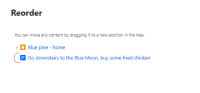
- As an user, try to hit the Show more below button to see more pages.
- No additional pages are loaded.

Expected Results
The additional pages should load just as expected since they exist and the user has permission to see them.
Actual Results
The content tree doesn't load more content and by checking the /cgraphql?q=PageTreeFollowingItemsQuery response we can see that the "currentPage": { parameter has the WRONG page as being the current one, pointing to the page that is outside the Overview page tree.
Workaround
Move the page that is outside the Overview page tree to be inside the Overview page tree, under the Space Settings => Reorder screen.

- is duplicated by
-
-

- Closed
-
-
-
- Closed
-
- mentioned in
-
Page Loading...
-
-
-
-
-
-