-
Type:
Bug
-
Resolution: Unresolved
-
Priority:
 Low
Low
-
Component/s: Analytics
-
None
-
3
-
Severity 3 - Minor
-
0
Issue Summary
The Inbound and Outbound stats (such as Total Clicks, CTR) under Linked Content of Page Analytics is Showing as Zero for customers instance and doesn't update even after clicks.
Steps to Reproduce
- Create a page
- Use "Link" macro/menu to insert link
- Insert a page's full web URL from address bar with a display text.
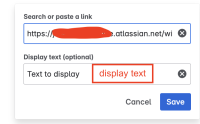
- Publish the page
- Click on the links a few times
- Check "Linked Content" page analytics and looks at metrics such as Total Clicks and CTR.

Expected Results
Values for 'Total Clicks' and 'Average click-through rate' for the links should be updated.
Actual Results
The count/values remains 0 if we select any time range.
Workaround
We recommend the below options for adding links to the page to get the Linked Content updated:
- Directly copy the full web URL from the address bar and paste it to the page.
- Add the full web URL (from the address bar) via the Insert Link macro without any display text.
