-
Type:
Bug
-
Resolution: Fixed
-
Priority:
 Low
Low
-
Component/s: Analytics
-
1
-
Minor
-
1
Issue Summary
- Site analytics shows "NaN" as a number of views on overview.
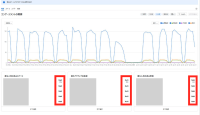

This issue doesn't affect all environments and some Confluence happened.
Additional, this issue happens only overview tab.
Steps to Reproduce
- Set the profile language for your Atlassian account to any CJK language https://id.atlassian.com/manage-profile/account-preferences
- Open Confluence.
- Navigate to [Apps] > [Analytics].
- View the Overview tab.
Expected Results
- Analytics shows accurate number of views.
Actual Results
- Analytics won't show accurate number of views and shows "NaN"
Workaround
- You can view the other tabs(Spaces, Users, and Search).
- The information on the Overview in each card corresponds with the first five results in the tables for the Spaces, Users, and Search tabs.
- Or, set the profile language to either English (US), or English (UK)

- mentioned in
-
Page Loading...