-
Type:
Bug
-
Resolution: Unresolved
-
Priority:
 Low
Low
-
Component/s: Page - Editor - Cloud
-
None
-
2
-
Severity 3 - Minor
Issue Summary
Down Arrow key takes the cursor to adjacent right cell, when the cursor is placed in between the text (not start or not at end of the text). The issue is with one browser only i.e. Chrome
Steps to Reproduce
- Go to Chrome, open a page in edit mode
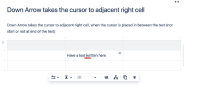
- Create a table, write something in any of the cell (not at the extreme right), place the cursor in the middle of the text.
- Hit down arrow key on your keyboard.
- The cursor will move to the adjacent right cell instead of the below cell

Expected Results
The cursor must move to the below cell of the table.
Actual Results
The cursor moves to the adjacent right cell instead of the below cell
Workaround
Place the cursor by clicking the mouse pointer at the desired cell of the table.
