-
Type:
Bug
-
Resolution: Fixed
-
Priority:
 Highest
-
Component/s: Page - Editor - Migration or Conversion to Fabric
-
22
-
Minor
-
43
Summary
Unable to convert Legacy pages to the New Editor if there's an Ampersand character in image property "Title"
Steps to Reproduce
- Create a page using Legacy
- Add image to a page
- Add Title in the image properties, including & character
- Publish page
- Edit page
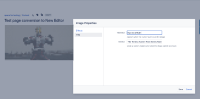

Expected Results
A popup showing:
This page can be converted to the new editor
Actual Results
A popup showing:
We aren't able to convert this page yet; once we solve this issue, the page will be convertible
Technical Notes
You may need to update the page source using REST API if Title isn't being updated on page publish. Use the following storage format:
<p><ac:image ac:title="Hello & World"><ri:attachment ri:filename="image2024-8-12_16-1-12.png" ri:version-at-save="1" /></ac:image></p>
Workaround
- Remove `&` character from the Title in Image Properties on all images
- Refresh and publish the page then convert page to New Editor
