Macro Usage Report count issue

XMLWordPrintable

    • 25
    • Severity 3 - Minor
    • 74

      Issue Summary

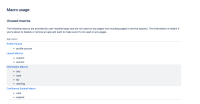
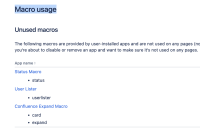
      The wrong "Unused macros" list is showing up in the Macro Usage Report.

      Steps to Reproduce

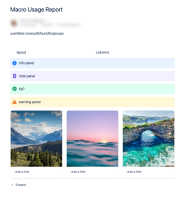
      1. Go to Macro Usage Report"
      2. See the list of "Unused macros"
        E.g.:
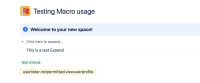
      3. Create a page with those macros
        E.g.:

      Expected Results

      The list should update and the macros should list the pages associated with them.

      Actual Results

      The list is not updated, and the same macros show in the list.

      Workaround

      Currently, there is no known workaround for this behavior. A workaround will be added here when available

        1. image-2024-07-22-10-04-21-396.png
          225 kB
          Elisa [Atlassian]
        2. image-2024-07-22-10-05-49-391.png
          1.26 MB
          Elisa [Atlassian]
        3. screenshot-1.png
          70 kB
          Neha Ghuraiya
        4. screenshot-2.png
          70 kB
          Neha Ghuraiya
        5. screenshot-3.png
          86 kB
          Neha Ghuraiya

              Assignee:
              Unassigned
              Reporter:
              Elisa [Atlassian] (Inactive)
              Votes:
              12 Vote for this issue
              Watchers:
              20 Start watching this issue

                Created:
                Updated: