-
Type:
Bug
-
Resolution: Fixed
-
Priority:
 Medium
-
Component/s: Whiteboard
-
None
-
1
-
Minor
-
0
Issue Summary
This is reproducible on Data Center: (no)
Steps to Reproduce
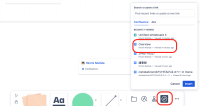
- Click "link" icon in the bottom of the whiteboard and select a page to show as a card

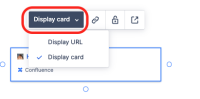
- Click the created card and click "Display URL"

Expected Results
the URL should be clickable.
Actual Results
the URL is not clickable.

Workaround
Currently there is no known workaround for this behavior. A workaround will be added here when available


- was cloned as
-
-
- In Progress
-