-
Type:
Bug
-
Resolution: Fixed
-
Priority:
 High
High
-
Component/s: Page - Editor - Legacy (TinyMCE)
-
3
-
Severity 3 - Minor
-
4
Issue Summary
When opening Preview the Legacy editor page, "Can't reach the server" error shows.
Steps to Reproduce
- Create a Legacy editor page
- Open a created page
- Click edit
- Click "Preview" at lower-right [...]
- error message appears.
Can't reach the server. Check you're connected to the internet and Confluence is up and running.
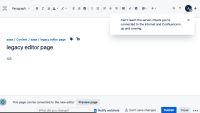
- wait about 1 minute, new message appears.
Successfully reconnected
We're back in business. You're free to save your page again.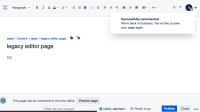


Expected Results
no error/messages appear.
Actual Results
error/messages appear.
Workaround
Currently there is no known workaround for this behavior. A workaround will be added here when available.
It looks to be possible to ignore the error and save(click Publish button).

