-
Type:
Bug
-
Resolution: Duplicate
-
Priority:
 Low
Low
-
Component/s: Page - Blog and Page Conversion
-
None
-
1
-
Minor
Issue Summary
Converting Legacy pages to New Editor removes applied colour formatting on text.
 The same issue is not observed on other text formatting, e.g. italics, bold, underline.
Steps to Reproduce
- Access any Legacy page(s) in your Confluence Site.
- Change the color of any text within the page.
- Save and publish the page.
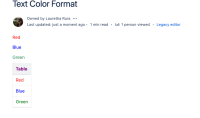 Storage Format:
<p><span class="legacy-color-text-red2">Red</span></p> <p><span class="legacy-color-text-blue4">Blue</span></p> <p><span class="legacy-color-text-green4">Green</span></p> <table><colgroup><col /></colgroup> <tbody> <tr> <th><span class="legacy-color-text-pink1">Table</span></th></tr> <tr> <td><span class="legacy-color-text-red2">Red</span></td></tr> <tr> <td><span class="legacy-color-text-blue4">Blue</span></td></tr> <tr> <td><span class="legacy-color-text-green2">Green</span></td></tr></tbody></table> <p class="auto-cursor-target"><br /></p>
- Then, attempt to convert the page to New Editor.

Expected Results
The page is converted successfully and any text formatting on the page is intact.
Actual Results
The page is converted successfully - however, any color text formatting on the page has been removed, i.e. any colored text is now shown in black color.

Storage Format:
<p>Red</p>
<p>Blue</p>
<p>Green</p>
<table data-table-width="1800" data-layout="default" ac:local-id="77619493-9ca2-4984-8c2c-712c2a50318d"><colgroup><col style="width: 760.0px;" /></colgroup>
<tbody>
<tr>
<th>
<p><strong>Table</strong></p></th></tr>
<tr>
<td>
<p>Red</p></td></tr>
<tr>
<td>
<p>Blue</p></td></tr>
<tr>
<td>
<p>Green</p></td></tr></tbody></table>
<p><br /></p>
Workaround
Clear formatting on the text and reapply the desired formatting again.


- relates to
-
-

- Closed
-