-
Type:
Bug
-
Resolution: Fixed
-
Priority:
 Medium
-
Component/s: Space - Overview
-
None
-
5
-
Severity 3 - Minor
-
0
Issue Summary
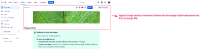
On an Overview page (Space Homepage), image header is shown in between of page title and page content. This issue is observed on sites with the New Confluence Look enabled.
 Image header should be shown below the page title (in between of page title and page content).
Environment
Confluence Cloud - New (Fabric) Editor
Steps to Reproduce
- Create a new space.
- Go to the Overview page.
- Add a header image to this page.
- Now, the page title is on the extreme left, in the middle of the header image and page content.

Workarounds
These steps would set the (header) image to align with the page content. However, the page title remains to be left aligned on the Overview page (Space Homepage) - CONFCLOUD-74029: Space Overview title alignment.
- Access the affected Space's homepage and download the applied image header.
- Edit the affected Space's homepage and remove the image header from the homepage.
- Then, add the downloaded image from Step no. 1 to the top of the page content (right below the page title, as an image attachment as opposed to an image header), with image alignment set to centre.
- Lastly, please save the page.

- mentioned in
-
Page Loading...