-
Type:
Bug
-
Resolution: Cannot Reproduce
-
Priority:
 Low
Low
-
Component/s: Space - Administration
-
2
-
Severity 3 - Minor
-
0
Issue Summary
- Reverting broken logo image to the default space logo won't fix BUG CONFCLOUD-70683
Steps to Reproduce
- Create a space with one of the Space Keys mentioned on this BUG CONFCLOUD-70683
- Click on Space Settings and update the space logo with a custom one;
- Due to this previous BUG, the logo will be displayed as a broken image.
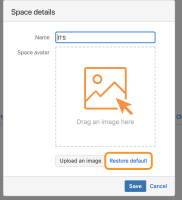
- Edit the logo again, and this time revert the logo back to the default one again.

Expected Results
- Logo to be reverted to the default space logo
Actual Results
- Space logo is still displayed as a broken image
Workaround
Currently, there is no known workaround for this behavior. A workaround will be added here when available

- is caused by
-
-

- Closed
-