-
Type:
Bug
-
Resolution: Fixed
-
Priority:
 Low
Low
-
Component/s: Macros - Table of Contents
-
None
-
2
-
Severity 3 - Minor
Issue Summary
Table of Contents Macro's listing is broken (unremovable disc/bullets and double headings)
Steps to Reproduce
- Add Table of Contents Macro on the page
- Below on the page, Add single-column tables and put heading in the table header.
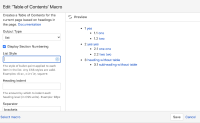
- Macro Settings-> Output Type: List, List Style: Empty
- Preview it (Disc will remain there long with the numbering).
- Save it.
- Publish the page.

Expected Results
The headings much not be duplicated and the disc shouldn't be there if it List Style is emptied.
Actual Results
The table headers are visible twice and only numbering should be there(no disc).

Workaround
Currently, there is no known workaround for this behavior. A workaround will be added here when available

