-
Type:
Bug
-
Resolution: Timed out
-
Priority:
 Low
Low
-
Component/s: Page - Editor - Cloud
-
5
-
Minor
Issue Summary
Kaspersky Internet Security's Web Antivirus Extension causing pages to freeze on Confluence Cloud. When a user tries to edit a page in the New Editor the tab becomes unresponsive (CPU 100%)
How to Replicate
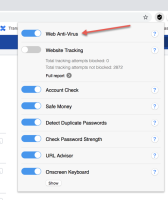
- Install Kaspersky Internet Security and Enable Web Antivirus Extension
>
- Go to https://<cloudsite>.atlassian.net/wiki/spaces/<spacekey>/pages/edit-v2/<pageid>
- Open Chrome task manager and notice how the CPU spikes to 100% after 10-15seconds
- Tab freezes:

Expected Results:
- Able to edit page with Web Antivirus enabled
Actual results:
- Unable to edit page with Web Antivirus enabled
Workaround
- Currently, the workaround is to disable the Web Antivirus Extension as it interferes with the Confluence editing experience and it's not something we have control of.
