-
Type:
Bug
-
Resolution: Fixed
-
Priority:
 Highest
-
Component/s: Page - Editor - Cloud, Page - Editor - Legacy (TinyMCE)
-
158
-
Severity 2 - Major
-
44
Issue Summary
We have been noticed about multiple different customers reporting that the page header, in the published mode, is missing for some pages, so they are unable to edit the pages.
Environment
- Cloud
Workaround
Clear all the temporary data for the page.
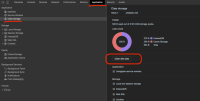
If you're on Chrome, you can follow the steps below:
- Access one of the pages on Confluence where you noticed the problem;
- Go to the browser's menu and select View -> Developer -> * Developer Tools*
- Open the Application tab and select * Clear Storage* on the left;
- Hit the Clear Site Data button;