-
Type:
Bug
-
Resolution: Duplicate
-
Priority:
 Low
Low
-
Component/s: Page - Tasks (Action Item)
-
None
-
2
-
Severity 3 - Minor
Issue Summary
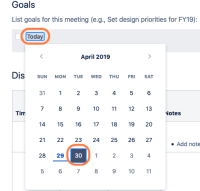
Inserting a "Date" macro on a 'task', selecting the next day (tomorrow) and publishing / previewing the page results in the date showing "Today", instead of displaying the correct date, or "Tomorrow".
Environment
- New editor;
- Date macro inserted into a 'task';
- Date selected is the next day;
Steps to Reproduce
- Create a new page, using the new editor;
- Add a task;
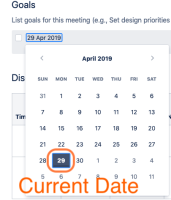
- Type "//" > add a "Date" macro into the task > Select the next day (tomorrow)


Expected Results
- Date to be correctly displayed (either as day DD MMM YYYY or "tomorrow")
Actual Results
- Date is displayed as "Today", even though the selected date is tomorrow

Notes
- This seems to happen when the date is placed within a task.
Workaround
Currently, there is no known workaround for this behavior. A workaround will be added here when available


- duplicates
-
-

- Closed
-