-
Type:
Bug
-
Resolution: Fixed
-
Priority:
 Medium
-
Component/s: Migrations - Space - Import, Space - Import / Export
-
23
-
Severity 2 - Major
-
0
Summary
After a space import, the spaces are not listed on the Space directory.

- however it can be accessed using the space key:
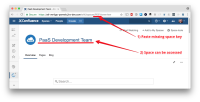

Steps to Reproduce
- Import a space.
- Go to the Space directory
Expected Results
The space is listed properly in the Space directory
Actual Results
The space is not listed in the Space directory
Workaround
This is an issue with indexing of the space being slow - please wait for a couple of minutes for the space to show up.
Alternatively to kick off another indexing task to get the space to show up faster, favourite the space and unfavourite it. The space will show up in the Space directory


