Log inSkip to main contentSkip to sidebar
IMPORTANT: JAC is a Public system and anyone on the internet will be able to view the data in the created JAC tickets. Please don’t include Customer or Sensitive data in the JAC ticket.
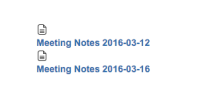
When you add Content by Label Macro to a page and set the text formatting to Bold and save it. The title of the page that contains the label would be shown below the page icon.
Steps to Reproduce
Add a Content by Label Macro to a Page
Set the formatting of the Content Label Macro to Bold
Save the page
Expected Results
The page title contating the label should be together with the icon.
Actual Results
The page title containing the label is below the icon.
Notes
It works fine if bold text formatting is removed in the Content Label Macro.
Bug
 Low
Low