-
Type:
Bug
-
Resolution: Timed out
-
Priority:
 Low
Low
-
Component/s: Extensibility - Macro
-
2
-
Severity 3 - Minor
Summary
- Internal links parameters like SPACEKEY:PAGETITLE or #advlink does not work. It is only working when you use the full link.
- The background color used ("class" parameter) is not working properly. When the cursor is in that box there's a flash of the background color defined as "class-rollover" but the background color does not remain as it did before.
Environment
Adaptavist Content Formatting Macro Version 2.0.7
Google Chrome Version 50.0.2661.94
Confluence Cloud: 1000.81.0
Steps to Reproduce
- Edit a page and insert a Style Macro.
.test { text-align : center; color:#FFFFFF; background-color:#3aaadc; padding-left: 5px; padding-right: 5px; padding-top: 10px; padding-bottom: 10px; margin-top: 2px; height:190px; } .test-rollover { text-align : center; color:#FFFFFF; background-color:#e95f40; cursor: pointer; padding-left: 5px; padding-right: 5px; padding-top: 10px; padding-bottom: 10px; margin-top: 2px; height:190px; } - Inset a Rollover Macro.
- In the Class field enter test
- In the Hover Class field enter test-rollover.
- In the Link field insert SPACEKEY:PAGETITLE
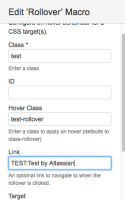
- Save the macro.
- In the Rollover macro placeholder, add a 'div' macro as a container for your rollover text. "Test by Atlassian Support"
- Save the page to see your text with a color background that changes on hover.

Expected Results
- Internal links parameters like SPACEKEY:PAGETITLE or #advlink should work.
- The background color used ("class" parameter) with this macro should be taken into account
Actual Results
- Internal links parameters like SPACEKEY:PAGETITLE or #advlink does not work.
- The background color used ("class" parameter) is not working properly.
Notes
- Tested in Confluence Server 5.9.4 and it works fine.
