-
Type:
Bug
-
Resolution: Fixed
-
Priority:
 High
High
-
None
-
Severity 2 - Major
-
Confluence
Issue Summary
When selected a space with the same space key exists on destination site, admins will be getting loop in "You removed spaces that exist on the destination" message on "Select spaces" page.
Steps to Reproduce
- Make sure source and destination sites have the spaces with the same space key
- Create a data transfer plan and select at least 1 space exists on destination site
- Go through the data validation and prompted the warning to remove duplicate space
- Click "Remove spaces" button and deselect the duplicate space
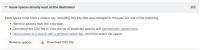
- Proceed with the data validation again, but will be redirected back to "Select spaces" page.

Expected Results
"Some spaces already exists on the destination" error resolves.
Actual Results
- Admin got looped back to "Select spaces" page and couldn't proceed with the migration
- The CSV file isn't listing all spaces exist on destination site, hence the error persists.
Workaround
Review all space keys and verify them with the destination site. Manually remove the space keys already exist on destination.

- is caused by
-
HOT-123236 Loading...