-
Type:
Suggestion
-
Resolution: Unresolved
-
Component/s: Teams - Invite People Modal
-
None
-
3
Issue Summary
When trying to add people under 'Project Settings > People and access > Add People', and if the invite is deactivated in the "User Access Settings", the customized message should be displayed.
Steps to Reproduce
- Under 'Admin Hub > Products > User Access Settings' : Disable the invites for the Jira product by setting it to "Don't allow invites", and set a customized message:
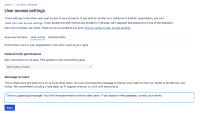
- Go to Jira and open one of the projects. Under 'Project Settings > People and access > Add People', try to add a new user.

Expected Results
The customized message should be displayed.
Actual Results
The actor is not able to insert a new email address by typing it and pressing enter if the user doesn't already exist on the site. An error message is displayed with "Choose at least one person".

P.S.: When the user does exist on the site, the account will be displayed when the actor types their email in the field, and they can be invited to the project.
Workaround
Currently there is no known workaround for this behavior. A workaround will be added here when available
Note
The customized message is displayed when inviting people via "Teams".


