-
Type:
Suggestion
-
Resolution: Low Engagement
-
Component/s: Rule - Edit Steps
-
None
Issue Summary
You can use a IF block to make issues be tested against multiple conditions (and then be edited or not by an action).
Currently the IF block seems to be producing inconsistent messages in the audit log through. Even though an issue did not pass all conditions, a message stating that the issue did pass through one conditions is displayed along with a failure one.
You cannot identify which conditions the issues are passing through or not, and that might give the idea that the issue is passing through conditions it shouldn't.
Steps to Reproduce
- Create an Automation rule with a IF block such as the following one:
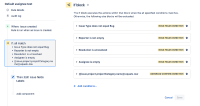
- Trigger an issue creation
- In that case I created an issue and made sure that the only condition it would not satisfy was the Assignee is Empty one

Expected Results
The audit log will either display that the issue did not pass through the conditions, or show which exact condition it did not pass through.
Actual Results
The audit log shows both a success and failure message for the same IF block, but you cannot identify what exactly happened:

Workaround
None at the moment.


- is related to
-
AUTO-1249 Automation IF block returning wrong information in the audit log
-

- Closed
-