-
Type:
Bug
-
Resolution: Unresolved
-
Priority:
 Low
Low
-
Component/s: Trigger - Manual from Issue
-
Severity 3 - Minor
-
Jira Software
Issue Summary
It is not possible to execute a manual automation rule on a selected work item on the board. The automation rules set on the project, including the ones with manual trigger, are greyed out when clicking the "Action" button.
Steps to Reproduce
- Go to a company-managed project board.
- Select a work item from the board ("cmd + click" or "ctrl + click") then click action button on the top right of the board.
- Automation rules will be greyed out, including the ones with a manual trigger.
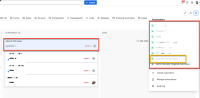
Expected Results

Automation rules having manual trigger enabled for execution on the selected work items on the board.
Actual Results
No automation rule is enabled for execution on the selected work items on the board
Workaround
Open the work item and execute the automation rule from its modal or tab.
